

Anti Virus
Strategy · Tower defence
Viruses are crawling toward your server. Build your defence, move the Guard, and keep every network safe.
- නොමිලේ
- ඇඩ් නෑ
- ඇප් එක ඇතුළේ ගෙවීම් නෑ
- ඉන්ටර්නෙට් නැතිවත් සෙල්ලම් කරන්න පුළුවන්
- කිසිම දත්තයක් එකතු කරන්නේ නෑ
- ඇකවුන්ට් එකක් ඕන නෑ
Anti Virus ළඟදීම ඇප් ස්ටෝර් වලට එනවා — නොමිලේ, ඇඩ් නැතිව. ගේම් එක ස්ටෝර් එකට ආපු දවසේම ඒ බටන් එක ලින්ක් එකක් වෙනවා.
පහළ විස්තරය ඉංග්රීසියෙන්. Anti Virus සෙල්ලම් කරන්න පුළුවන් ඉංග්රීසි සහ ඉතාලි වලින්.
පින්තූර


ගේම් එක ගැන
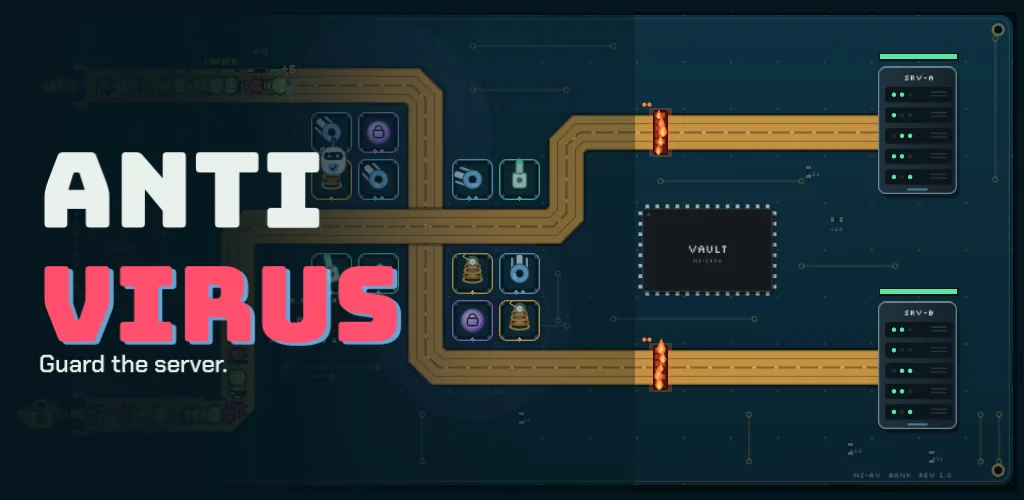
On a circuit board, copper buses run from the ports to the servers — and bugs, worms, Trojans and ransomware are coming down them. You are the Anti-Virus Guard: build turrets, firewalls and logic bombs along the way, step into the fight yourself, and do not let a single server fall.
Eight networks, from a home PC to Nugezza HQ, each with its own buses, ports and servers. Every virus behaves like its real namesake, so each one asks for a different answer.
Six defences
Ping Turrets fire fast, Sandboxes slow viruses down and expose the ones in disguise, Arc Coils throw lightning from virus to virus and Deep Scan cuts through armour. Firewalls block the bus; Logic Bombs wait for the first virus to step on them.
Know your enemy
Bugs come in swarms. Worms copy themselves if you are slow. Trojans look like harmless files until a Sandbox exposes them. Ransomware locks your towers. And at the end waits the Rootkit.
You are the Guard
Move the Guard anywhere on the board. It fights beside your towers, sees the viruses they cannot, unlocks locked towers and fires a Full Scan that hits every virus at once.
Tested to be beatable
Before each release, reference players defend every network to the end: with no defence every network falls, and a player who uses the Guard wins all eight.
සෙල්ලම් කරන හැටි
Phone and tablet
- Build
- Tap an empty square, tap a defence to see what it does, tap it again to build. Firewalls and Logic Bombs go on the copper bus.
- Upgrade or sell
- Tap a defence you have built.
- Move the Guard
- Tap the Guard, then tap where it should go — or drag it there.
- Waves
- START WAVE begins the first one; calling the next wave early pays bonus bits.
- Pause
- The pause button, the back button, or leave the game: it pauses itself.
Windows — mouse and keyboard
- Build, upgrade, sell
- Click a square or a defence, then click a choice. Right-click cancels.
- Start or call a wave
- Space.
- Guard and Scan
- G selects the Guard, S fires the Scan.
- Speed
- F switches between 1×, 2× and 3×.
- Pause
- P or Esc.
විස්තර
| මිල | නොමිලේ |
| ඇඩ් | නෑ |
| ඇප් එක ඇතුළේ ගෙවීම් | නෑ |
| එකතු කරන දත්ත | නෑ — පෞද්ගලිකත්ව ප්රතිපත්තිය කියවන්න |
| ඉන්ටර්නෙට් | ඕන නෑ |
| ඇකවුන්ට් | ඕන නෑ |
| භාෂා | ඉංග්රීසි සහ ඉතාලි |
| උපාංග | Android · iPhone සහ iPad · Windows |
| වර්ෂන් එක | 1.0.0 |
| හැදුවේ | Nugezza Developer |
ප්රශ්න
Anti Virus ගන්නේ කොහෙන්ද?
Is Anti Virus really free?
Does it scan my device for viruses?
Do I need the internet to play?
Where is my progress kept?
Is it suitable for children?
Which languages is it in?
Anti Virus ගැන ප්රශ්න තියෙනවද?
දැන්ම අපිත් එක්ක චැට් කරන්න, නැත්නම් පණිවිඩයක් එවන්න — ඒක හදපු අයම උත්තර දෙනවා.